

As an AEM full-stack web developer who frequently works with AEM components, it’s not uncommon to require access to the AEM Style System configuration of a specific component. This information can prove invaluable when writing conditional algorithms to manipulate data output. However, the question remains: how can one retrieve the necessary AEM Style System information from within the components themselves via the backend?
Thankfully, Adobe offers a useful tool in the form of the com.adobe.cq.wcm.style.ComponentStyleInfo Sling model utility class. This class provides a straightforward means of accessing vital information about the styles applied to a component via Style System. By utilizing the methods provided by ComponentStyleInfo, developers can quickly and easily obtain the style information necessary to enhance the functionality of their AEM components.
In this blog article you will find examples on how to get the AEM Component’s Style System configuration from the backend using sling models or just with the resource object itself.
A. Code Example of resource.adaptTo(ComponentStyleInfo.class)
In the examples below we will observe a targeted component as a “Resource” which we will adapt the ComponentStyleInfo.class.
1 | ComponentStyleInfo componentStyleInfo = resource.adaptTo(ComponentStyleInfo.class); |
Once the resource have been adapted, you can see all these available properties. Here you can access the entire component’s policies, like the ability to view:
- appliedCssClasses: list of applied CSS classes (this is a String type).
- styles: Which is a list of the AEM Style System items that has been selected, with all the meta data involved (this is a LinkedList type)
- contentPolicyStyleInfo: this an object that exposes the entire AEM Style System, Style Groups, that is configured for this given component.
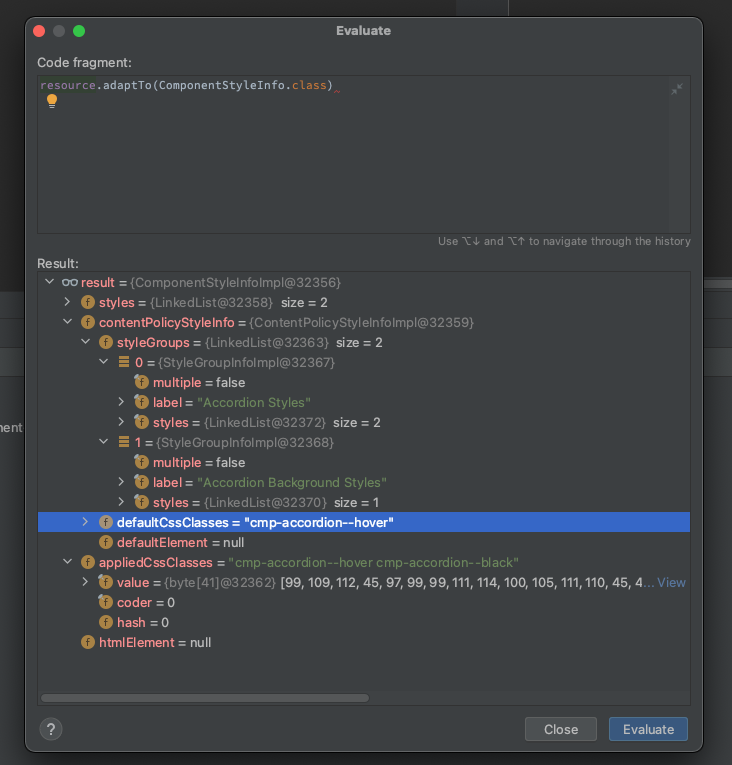
B. Code Example of testing appliedCssClasses
1 2 3 4 5 6 7 8 9 10 | String appliedCssClasses = Optional.ofNullable(this.resource.adaptTo(ComponentStyleInfo.class)) .map(ComponentStyleInfo::getAppliedCssClasses) .filter(StringUtils::isNotBlank) .orElse(null); if (appliedCssClasses.contains("my-class") { // execute } else { // do nothing } |




Very great insight, thank you.
Thank you, this is amazing.
This works!